✨ Introduction
Have you ever sat at your desk, trying to work from home, but ended up feeling distracted, uncomfortable, and completely unproductive? You’re not alone. Many people struggle with turning a simple desk into a functional workspace.
😩 The Real Problem: Why Your Desk Isn’t Working for You
Most home desks are not designed for long working hours.
💡 Real-Life Scenario:
- You hunch over your laptop → neck & back pain
- Your screen is too low → eye strain
- Cables and clutter → mental stress
- No dedicated workspace → low focus & productivity
By afternoon, you’re exhausted—not from work, but from discomfort.
👉 That’s the real issue: your desk isn’t optimized for work.
✅ Step-by-Step Solution to Transform Your Desk
Before buying anything, let’s fix things the smart way.
1. 🧹 Declutter Your Desk
Remove everything that’s not essential:
- Old papers
- Random gadgets
- Unused items
👉 A clean desk = a clear mind.
2. 📏 Fix Your Screen Height
Your screen should be at eye level.
- If it’s too low → you bend your neck
- If it’s too high → strain increases
👉 Use books or boxes as a temporary fix.
🚀 Why a Monitor Riser is a Game-Changer
Even after basic fixes, most people still struggle with screen height.
That’s where monitor risers and laptop stands come in.
They help you:
- Maintain proper posture
- Reduce neck strain
- Keep your desk organized
- Improve airflow for devices
🛠️ Best Monitor Risers & Laptop Stands (Detailed Review)
1. BESIGN Aluminum Ergonomic Laptop Stand
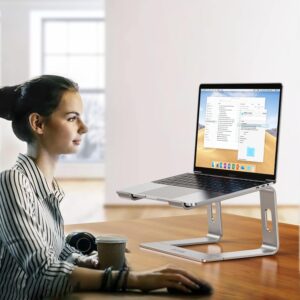
This stand is a popular choice for remote workers who want a sleek and ergonomic setup. It elevates your laptop to eye level and improves airflow with its open design.
⭐ Key Features:
- Premium aluminum build
- Ergonomic height design
- Detachable & portable
- Heat dissipation design
👍 Pros:
- Sturdy and durable
- Modern minimalist look
- Great for long work hours
👎 Cons:
- Fixed height (not adjustable)
- Requires external keyboard
🎯 Best For:
Professionals who want a clean and stable desk setup.
2. Adjustable Foldable Laptop Stand
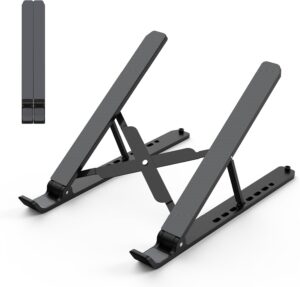
A flexible and budget-friendly option, this stand is perfect for people who work from different locations.
⭐ Key Features:
- Adjustable height and angle
- Foldable & lightweight
- Anti-slip silicone pads
- Ventilated design
👍 Pros:
- Highly portable
- Affordable
- Customizable viewing angles
👎 Cons:
- Slightly less sturdy than metal stands
- Not ideal for heavy laptops
🎯 Best For:
Students and freelancers who need a portable solution.
3. Nulaxy Ergonomic Aluminum Laptop Stand
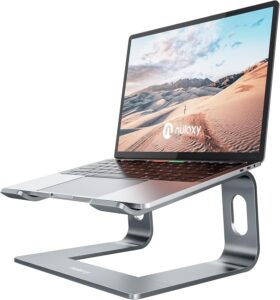
This premium stand combines durability with ergonomic design, making it ideal for long-term use.
⭐ Key Features:
- Solid aluminum body
- Ergonomic height positioning
- Strong weight support
- Cooling airflow design
👍 Pros:
- Extremely stable
- Premium build quality
- Suitable for heavy laptops
👎 Cons:
- Slightly expensive
- Not height adjustable
🎯 Best For:
Users who want a long-lasting, high-quality stand.
4. Amazon Basics Adjustable Monitor Riser
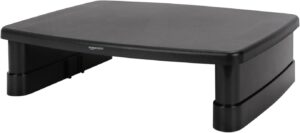
A simple yet effective monitor riser that works well for desktops and printers.
⭐ Key Features:
- Adjustable height levels
- Wide platform
- Non-slip feet
- Budget-friendly
👍 Pros:
- Very affordable
- Easy to use
- Supports monitors & accessories
👎 Cons:
- Basic design
- Not very stylish
🎯 Best For:
Anyone looking for a low-cost ergonomic upgrade.
5. Vented Monitor Stand Riser Platform
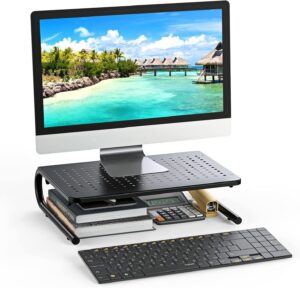
Designed for multi-purpose use, this stand supports monitors, laptops, and even printers.
⭐ Key Features:
- Ventilated platform
- Durable construction
- Multi-device support
- Space-saving design
👍 Pros:
- Great airflow
- Versatile usage
- Strong and stable
👎 Cons:
- Fixed height
- Bulky for small desks
🎯 Best For:
Users who need a multi-functional desk solution.